Colorize Terminal Text with Escape Sequences in Linux
Share on:Edit on: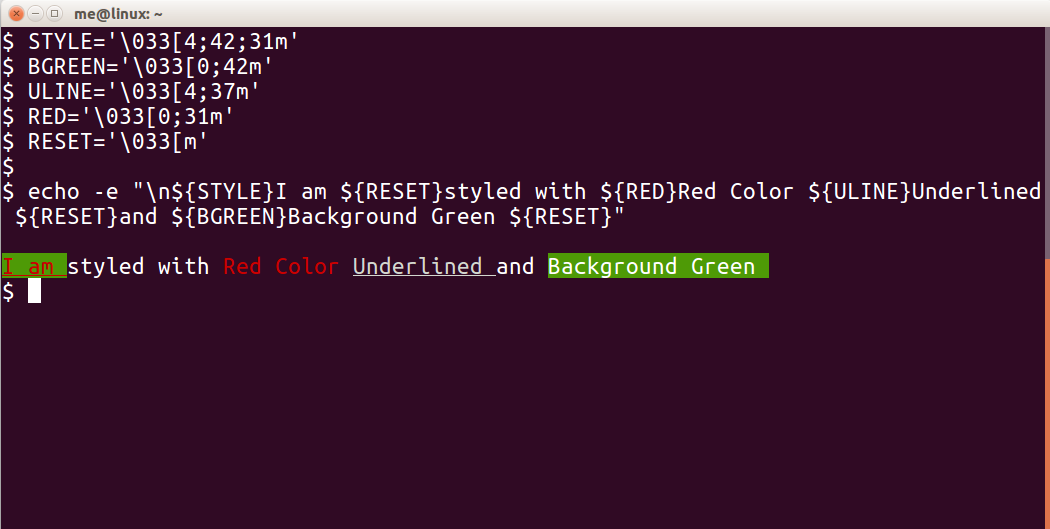
ANSI escape codes can be used to style the output of echo or printf. An escape code is a sequence of characters start with an ESC character, followed by second character in the ASCII range 64 to 95. This sequence can be of different length.
The general format of escape code for styling the terminal text is:
ESC[{attr1};{attr2};....{attrn)m.
Note that above escape code sequece ends with m and there is no ; before that.
The ASCII equivalent of ESC character is 033(in decimal) or 0x1b(in hexa). We use 033 because it works for all operating systems.
Some examples for escape codes are:
'\033[0m'       #Reset text
'\033[0;33m'    #Yello color text
'\033[42m'      #Green background
'\033[1;42m'    #Bold text with Green background
If we examine the code '\033[1;42m',
| \033 | [ | 1 | ; | 42 | m |
|---|---|---|---|---|---|
Octal value of ESC char. | left square bracket | Attribute 1 (bold) | Divider | Attribute 2 (Green) | Ending Char. |
Usage with echo
$ echo -e '\033[1;42m'This is text with green backgroundDon’t forget to use -e option along with echo command. Any text following the above code sequence will print with green background color.
Usage with printf
$ printf '\033[1;42m'This is text with green backgroundText Formatting
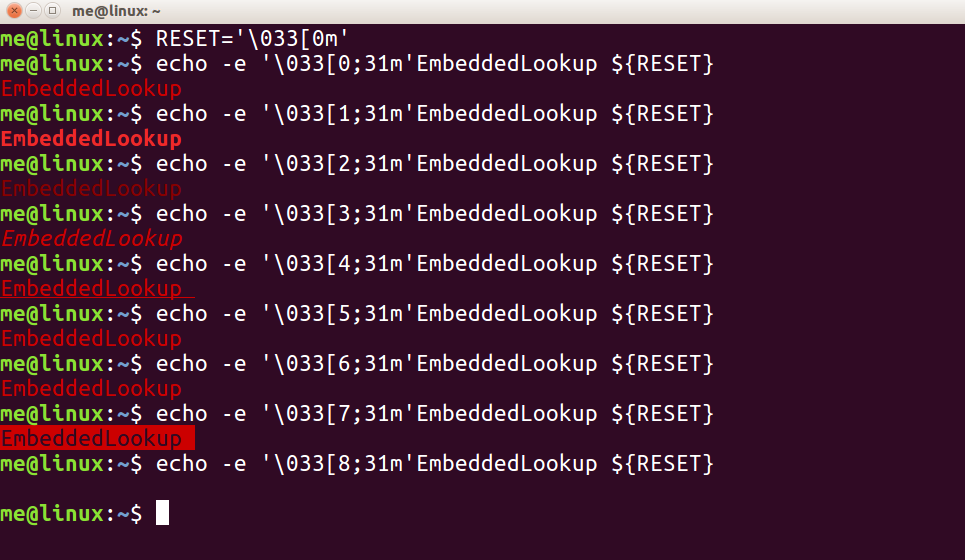
Examples of text formatting:
| Value | Escape Code | Text Style |
|---|---|---|
| 0 | '\033[0;31m' | Regular |
| 1 | '\033[1;31m' | Bold |
| 2 | '\033[2;31m' | Low Intensity |
| 3 | '\033[3;31m' | Italic |
| 4 | '\033[4;31m' | Underline |
| 5 | '\033[5;31m' | Blinking |
| 6 | '\033[6;31m' | Reverse |
| 7 | '\033[7;31m' | Background |
| 8 | '\033[8;31m' | Invisible |
Text Colour
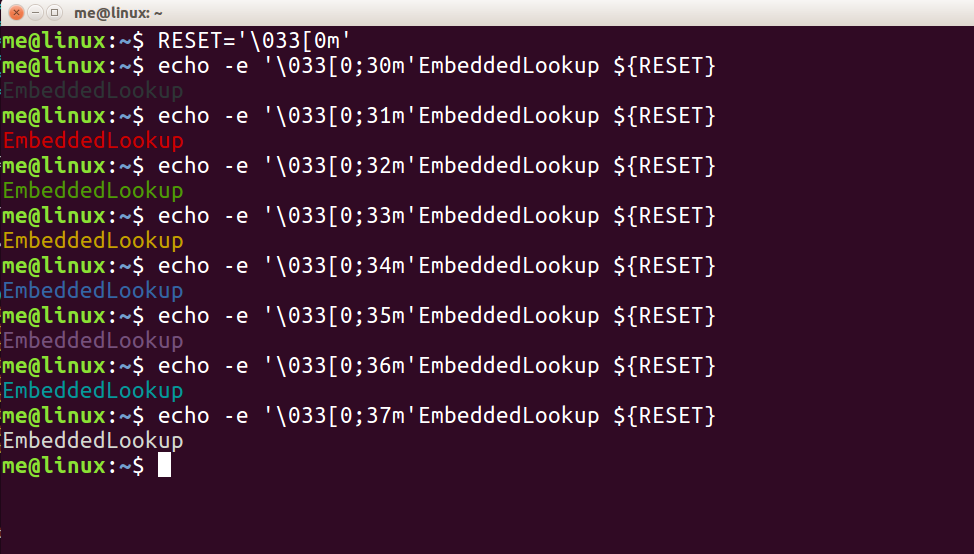
Examples of text color:
| Value | Escape Code | Text Color |
|---|---|---|
| 30 | '\033[0;30m' | Black |
| 31 | '\033[0;31m' | Red |
| 32 | '\033[0;32m' | Green |
| 33 | '\033[0;33m' | Yello |
| 34 | '\033[0;34m' | Blue |
| 35 | '\033[0;35m' | Magenta |
| 36 | '\033[0;36m' | Cyan |
| 37 | '\033[0;37m' | White |
Background Colour
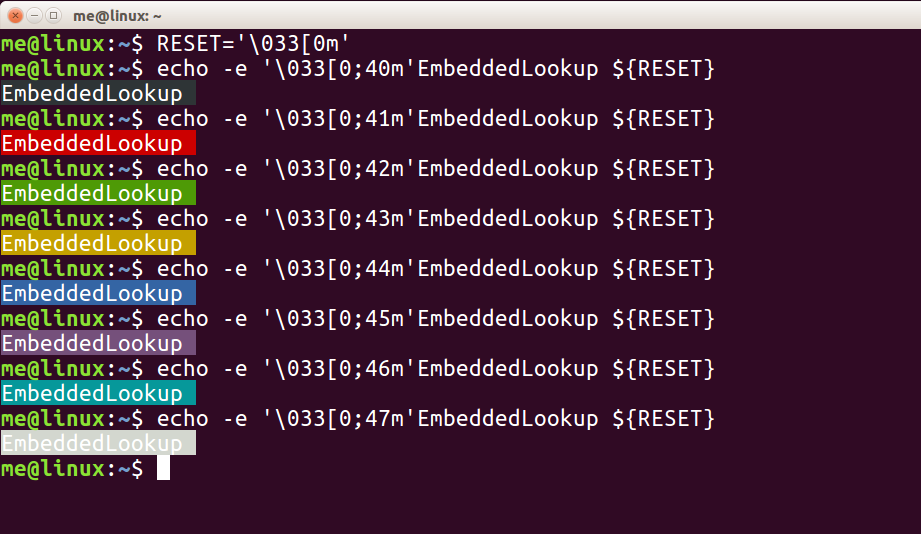
Examples of Background color:
| Value | Escape Code | Background Color |
|---|---|---|
| 40 | '\033[0;40m' | Black |
| 41 | '\033[0;41m' | Red |
| 42 | '\033[0;42m' | Green |
| 43 | '\033[0;43m' | Yello |
| 44 | '\033[0;44m' | Blue |
| 45 | '\033[0;45m' | Magenta |
| 46 | '\033[0;46m' | Cyan |
| 47 | '\033[0;47m' | White |
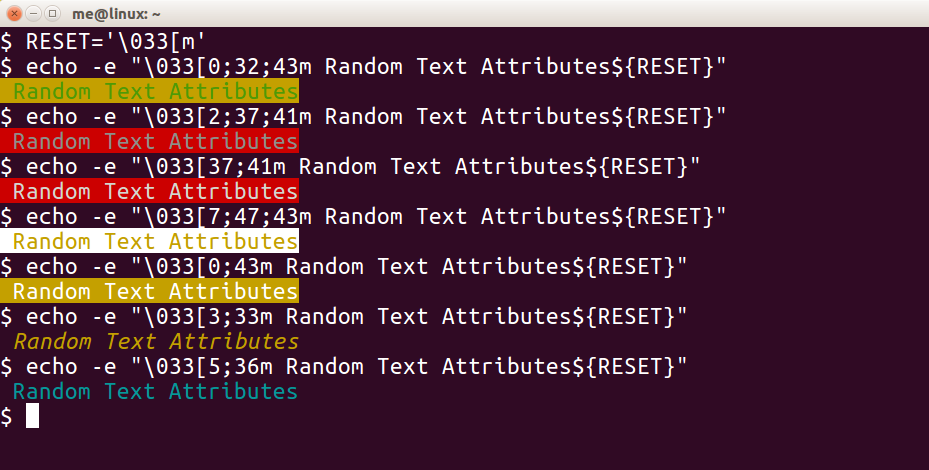
Random Text Style Attributes
One or more attributes can be clubbed together for more styling.
A simple color echo solution for shell scripts
Save the following code in a file, let’s say cecho.sh
cecho() {
	local code="\033["
	case "$1" in
		black  | bk) color="${code}0;30m";;
		red    |  r) color="${code}1;31m";;
		green  |  g) color="${code}1;32m";;
		yellow |  y) color="${code}1;33m";;
		blue   |  b) color="${code}1;34m";;
		purple |  p) color="${code}1;35m";;
		cyan   |  c) color="${code}1;36m";;
		gray   | gr) color="${code}0;37m";;
		*) local text="$1"
			esac
			[ -z "$text" ] && local text="$color$2${code}0m"
			echo -e "$text"
}
Including the above file in any shell script will allow us to print color text on terminal.
Let’s say file display.sh has the following content.
#!/bin/sh
. /path/to/cecho.sh

cecho red "This is red text"
Now executing second shell script will display output in red color.
$ bash display.sh

References
bash:tip_colors_and_formatting